
You can purchase season tickets or top up value on a Waltti travel card in the Waltti online store, at service and sales points, and on buses. With the Waltti Mobile app, you can buy single, day, and season tickets to your phone. Tickets purchased for the travel card (for example, in the online store) cannot be used in the Waltti Mobile app, and mobile tickets cannot be used on the travel card.
Value is money stored on the card that can be used to pay for value tickets. A Waltti card can hold between €0.65 and €500. The value on the card remains valid for six (6) years from the end of the calendar year in which there was last activity on the customer’s travel account.
A season ticket on a Waltti travel card is valid for 2 years from the date of purchase. After that, the season ticket is automatically removed from the travel account, regardless of whether it has been activated or not, or whether there are any days remaining.
Waltti online storeTop-up fee
No top-up fee is charged for top-ups made in the Waltti online store or at service and sales points.
At R-kioski, a service fee of 3.06% of the net top-up amount is charged. For example, in addition to the price of an adult 30-day season ticket for one zone, the customer pays a top-up fee of less than €2.
A €2 top-up fee is charged when topping up a Waltti card on the bus. On buses, the maximum amount that can be added as value is €50, so please have the exact amount ready (note that the top-up fee is charged in addition).
On buses, travel cards can only be topped up with cash. Payment by bank card is not accepted for top-ups. However, a single journey can be paid for by bank card on the bus.
A new Waltti travel card costs €5.
A reflective card holder is available for €1 at service points.
Service and sales points
Travel card
A Waltti travel card can be purchased either as a personal card or as a holder-specific card.
A personal card can only be used by the cardholder. Season tickets and value can be loaded onto the card.
A holder-specific card can be used by anyone belonging to the same customer group (age group), making it suitable, for example, as a shared card for children in a family. Only value can be loaded onto a holder-specific card; season tickets cannot be added. A holder-specific travel card can only be purchased at service or sales points, not from the Waltti online store. However, it can be topped up in the Waltti online store.
If your personal card is lost, the card’s personalisation allows the value or season ticket to be transferred to a new card. A holder-specific card, on the other hand, is comparable to cash: if it is lost, it cannot be cancelled, and any tickets on it cannot be transferred to another card.
Value loaded onto a Waltti travel card does not expire.
A season ticket on a Waltti travel card is valid for 2 years from the time of purchase. After that, the season ticket is automatically removed from the travel account, regardless of whether it has been activated or not, or whether there are any days remaining.
A Waltti card can hold two season tickets at the same time (one active and one waiting).
A personal Waltti card can have both a season ticket and stored value at the same time. If both are available, the ticketing system will use the season ticket by default. If you wish to pay for a journey using value, you must select “poikkeusmatka” before validating the card.
Student ticket
A student ticket for a Waltti travel card can be purchased from the Waltti online store or at service points upon presentation of a valid student certificate. Please remember to bring an ID with you. Student tickets can also be purchased via the Waltti Mobile app.
When purchasing a Waltti card for the first time at a service point, you can, if you wish, print and fill in the pre-registration form in advance before visiting the service point.
Pre-registration form Service pointsWaltti online store
In the Waltti online store, you can top up your travel card without registering or by creating your own user account. When you register a user account in the Waltti online store, you gain access to more extensive services. You can link multiple cards to your account, allowing the added cards to be managed and topped up through the account. Your previous purchases are also visible in your user account. Registration is easy and only requires an email address and a password.
Tickets purchased in the Waltti online store do not appear in the Waltti Mobile app.
Start shopping from the Waltti online store homepage by selecting either “Top up travel card” or “Order a new travel card.”
Waltti online storeTravel card
You can conveniently purchase a Waltti travel card from the Waltti online store, and at the same time load a ticket product onto it. The new card will be delivered to your home within 7–14 days of placing the order. The ticket loaded onto the card will only be available for use once you receive the card.
A Waltti travel card can be purchased either as a personal card or as a holder-specific card. A new holder-specific travel card cannot be purchased from the Waltti online store, only value can be loaded onto such a card.
A personal card can only be used by the cardholder. Season tickets and value can be loaded onto the card.
A holder-specific card can be used by anyone belonging to the same customer group (age group), making it suitable, for example, as a shared card for children in a family.
In the online store, a personal travel card shows the card’s stored value, valid and upcoming season tickets, as well as the card’s usage and top-up history. For a holder-specific card, only the stored value is visible.
If your personal card is lost, the card’s personalisation allows the value or season ticket to be transferred to a new card. A holder-specific card, on the other hand, is comparable to cash: if it is lost, it cannot be cancelled, and any tickets on it cannot be transferred to another card.
A Waltti travel card works in two ways: as stored value or as a season ticket. With stored value, you pay for individual journeys, and with a season ticket, you can travel unlimited within the selected zones. The validity of a season ticket begins from the first use. You can also load a second season ticket onto the card in advance to wait for the current season ticket to expire. The waiting season ticket is activated the next time you use the travel card after the previous season ticket has expired.
When purchasing the card, a customer group and default zones are defined for the card based on the customer’s primary travel needs (for example, commuting between home and work).
A season ticket on a Waltti travel card is valid for 2 years from the time of purchase. After that, the season ticket is automatically removed from the travel account, regardless of whether it has been activated or not, or whether there are any days remaining.
A Waltti card can hold two season tickets at the same time (one active and one waiting).
A personal Waltti card can have both a season ticket and stored value at the same time. If both are available, the ticketing system will use the season ticket by default. If you wish to pay for a journey using stored value, you must select “poikkeusmatka” before validating the card.
Deactivating and activating a Waltti card in the Waltti online store
A strongly authenticated user can deactivate their own personal Waltti card in the Waltti online store, for example if the card is lost or misuse is suspected. A closed Waltti card can be reactivated if the card is later found.
If the card deactivated in the Waltti online store cannot be found, the card can be replaced with a new card via the service point application.
Please note:
- Only a strongly authenticated user can deactivate or activate their own personal Waltti card.
- A card deactivated in the Waltti online store can only be reopened in the Waltti online store.
- A card deactivated via the service point application can only be replaced with a new card; it cannot be reactivated.
- Holder-specific cards or other users’ personal cards cannot be deactivated or activated in the Waltti online store.
- A closed card cannot be used, and value or ticket products cannot be purchased onto it.
- Log in to the Waltti online store and find the correct card under the “Travel cards” tab.
- If needed, a personal Waltti card can be added manually to the user account using the “Add new travel card” button, or by updating the travel card list (using the “Update travel card list” button).
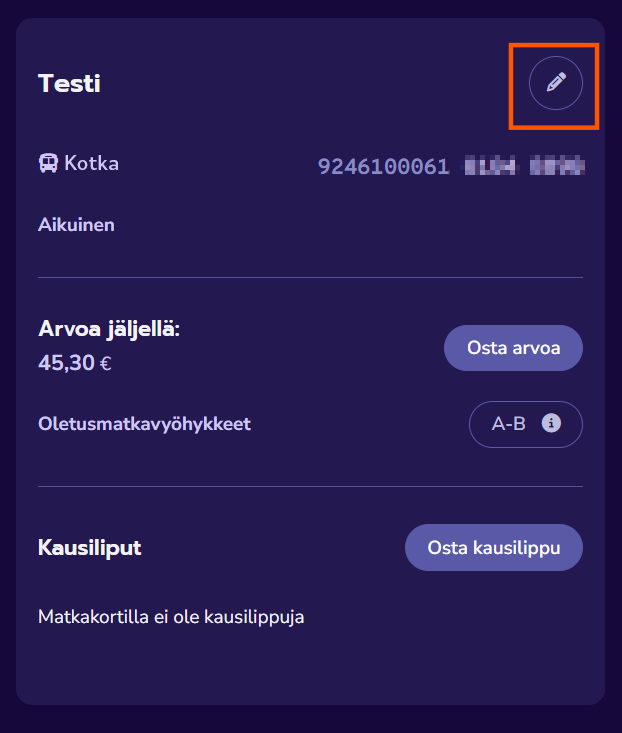
- In the card details, select “Edit” (the pencil icon).
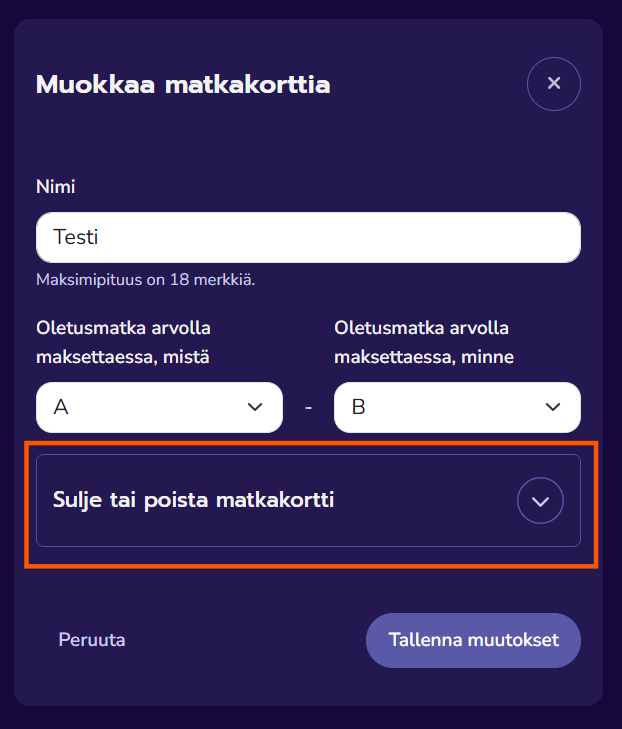
- Open the “Deactivate or remove travel card” menu.
- Choose deactivate card.
- Deactivating the card prevents the card and the products on it from being used.
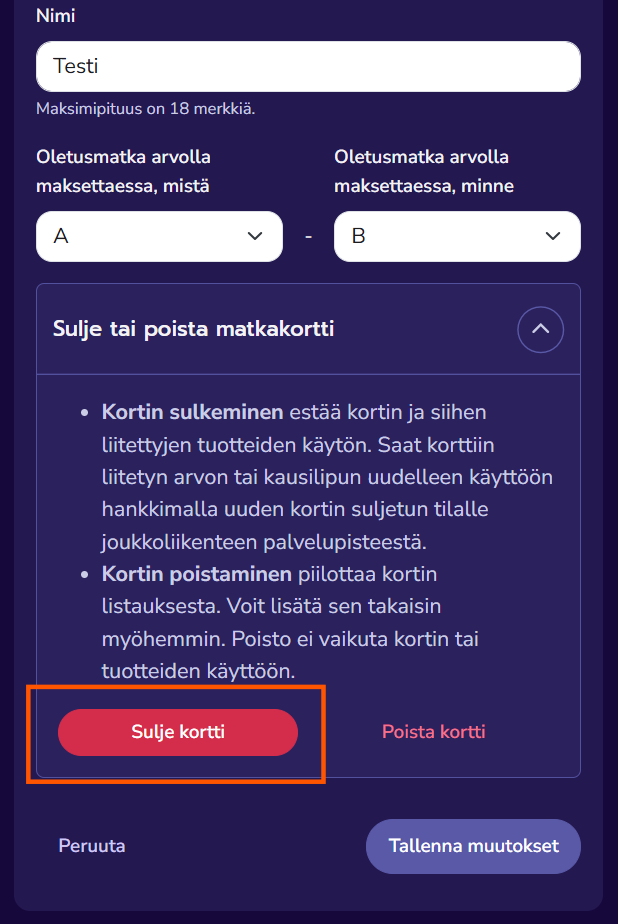
- Confirm deactivation by choosing “deactivate”

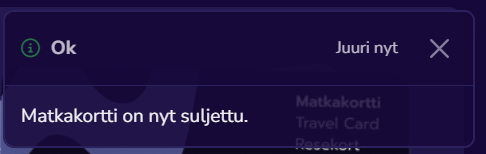
- Travel card is now deactivated
- Log in to the Waltti online store and find the correct card under the “Travel cards” tab.
- In the card details, select “Edit” (the pencil icon).
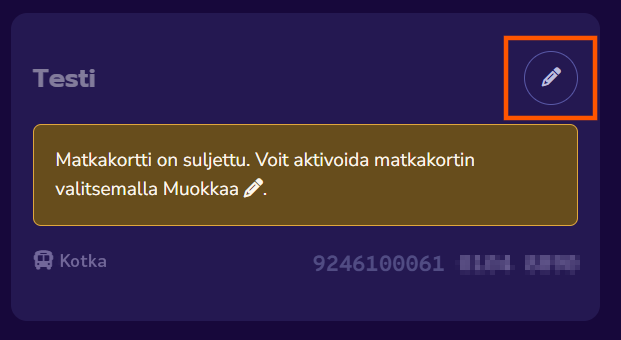
- Open the “Activate or remove travel card” menu.
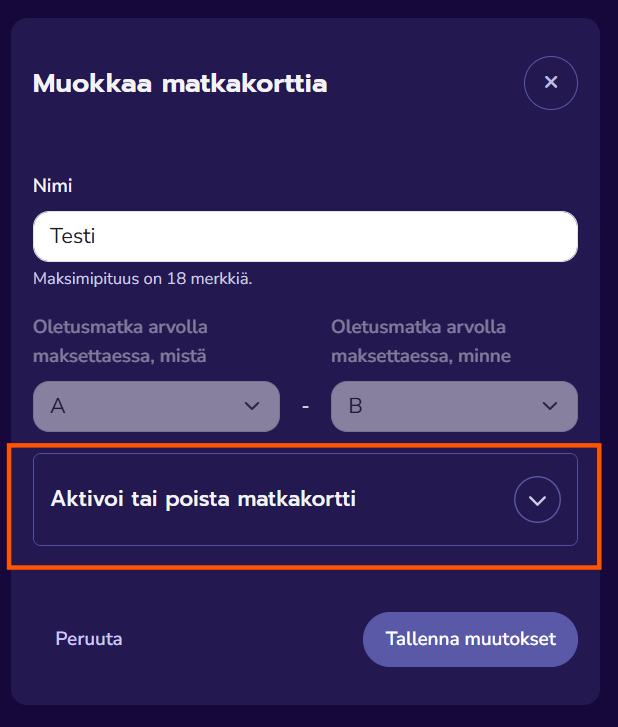
- Select “Activate card.”
- Activation restores the card and the products on it to use.
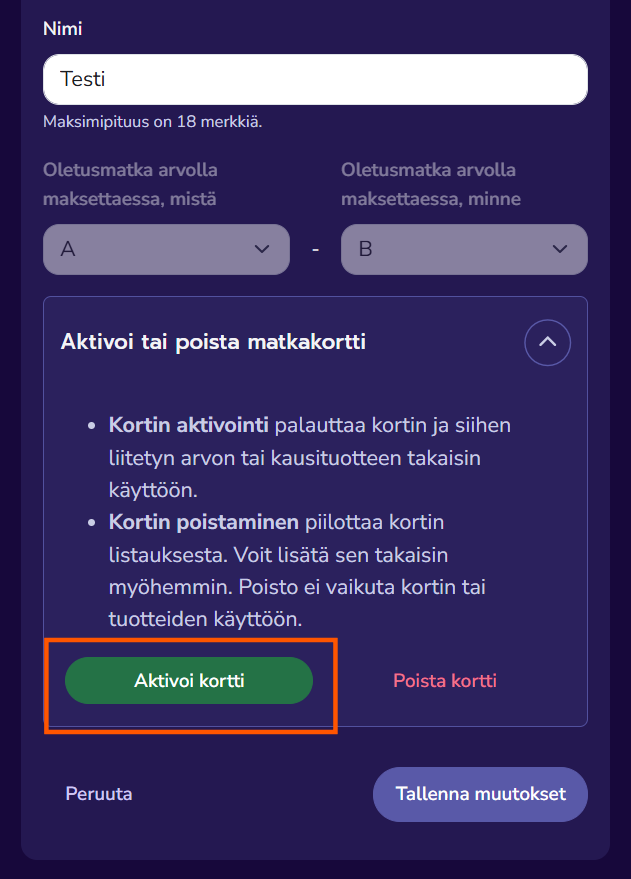
- Confirm the activation by selecting “Activate card.”
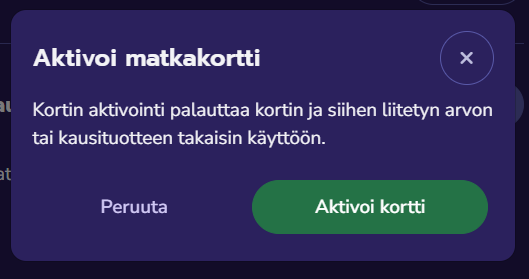
- The travel card is now activated.
Student ticket
A student ticket for a Waltti travel card can be purchased from the Waltti online store or at service points upon presentation of a student certificate. Purchasing student ticket products in the Waltti online store requires registration.
Service points- A student must first register for the Waltti online store. Registration can also be done via the Waltti Mobile app.
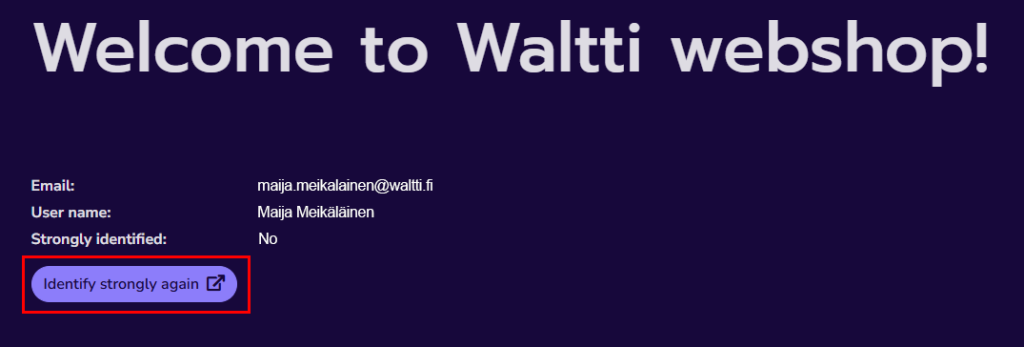
- After registering, the student must log in to their user account in the Waltti online store and complete strong authentication using their online banking credentials or a mobile certificate via the “Strong authentication” button.
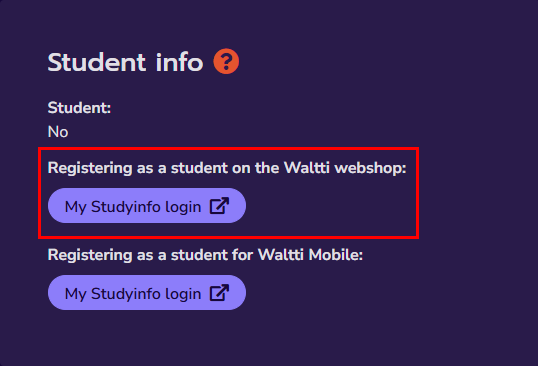
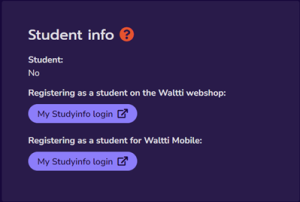
- Next, the student must verify their student status via the Studyinfo (Opintopolku) link (Account > My details > Student info). Note: The upper “Verify as a student” link applies to the Waltti online store and also allows the student status to be updated on the customer’s travel card. For Waltti Mobile, the customer must use the lower link.
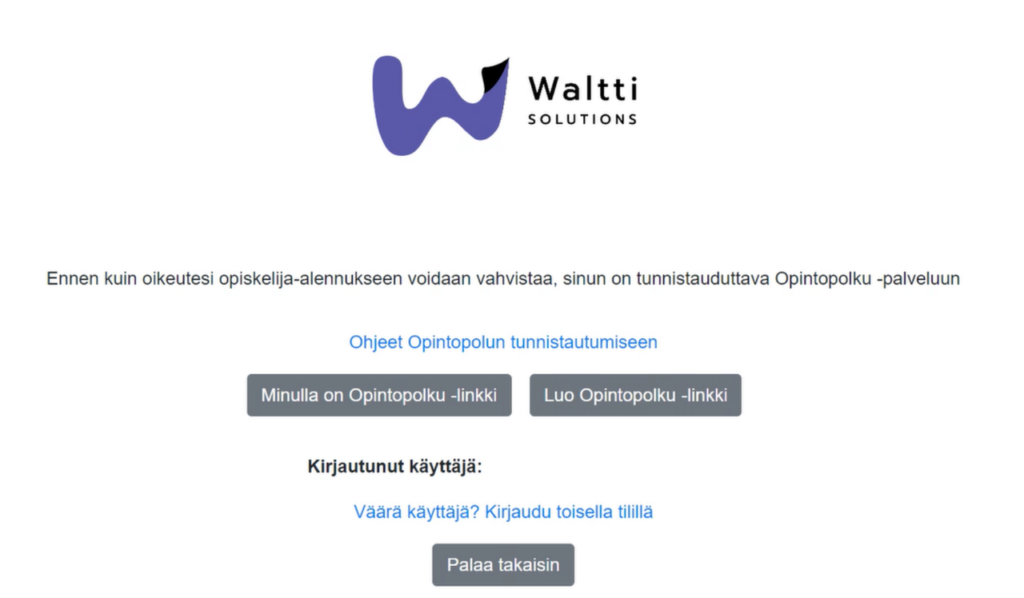
From the “Verify as a student” button, the customer is directed to retrieve their own so-called study link from Studyinfo (Opintopolku), which contains a valid study entitlement. The study link is read and used to verify that the customer is indeed the holder of the Waltti online store user account and that their student status is valid. The information about valid student status is then updated in the background.
For more detailed instructions on using the Studyinfo (Opintopolku) service, see the guide: “How to create a link in the Studyinfo service.”
- After student verification, the student can add the details of their personal Waltti card to their user account in the Waltti online store. If student products are included in the Waltti online store tariff set by the authority, the student can load student season ticket products onto the card.
Kela-subsidised student tickets
If a student is eligible for Kela’s school transport subsidy, the subsidy is applied for directly in Kela’s e-service (OmaKela).
Kela-subsidised student tickets are available in the Waltti Mobile app, the Waltti online store, and at Waltti service points.
A Kela-subsidised student ticket can be purchased by selecting all zones (i.e. A–B).
Waltti Mobile app
The Waltti Mobile app can be downloaded from your phone’s app store. The app also includes other Waltti cities. When selecting a city, choose Kotkan seudun liikenne.
The validity of tickets purchased in the mobile app begins immediately at the time of purchase.
Tickets purchased in the mobile app do not appear on the Waltti travel card.
Registering in the app is recommended:
Purchasing a season ticket requires registration and logging into the app.
If your phone is replaced, broken, or lost, a valid season ticket can be transferred to a new phone once you have registered.
You can log in to the Waltti Mobile app using the same user credentials as for the Waltti online store.
How to purchase a student ticket in the Waltti Mobile app
A student-priced 30-day season ticket is available not only for the Waltti travel card but also in the Waltti Mobile app. The price of the ticket is the same regardless of whether it is loaded onto a Waltti travel card or used in the Waltti Mobile app.
Purchasing a student ticket in the mobile app requires both strong authentication and verification of student status.
Purchasing student ticket products in the Waltti Mobile app requires logging into the app. When purchasing student ticket products in the app, the app provides a link to the Waltti online store, where you must log in using the same credentials as in the app, complete strong authentication, and verify your student status via the Studyinfo (Opintopolku) service.
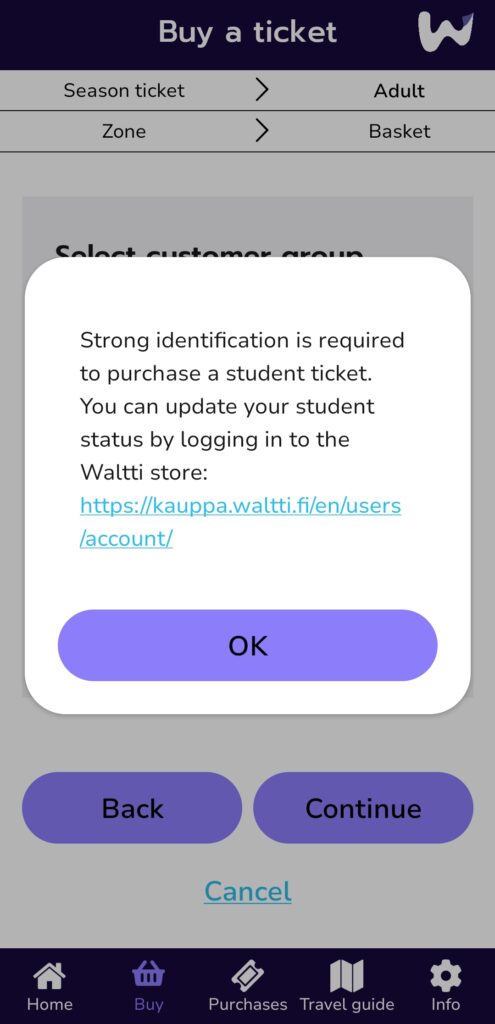
Steps for student verification
1. Register in the Waltti online store or in the Waltti Mobile app.
2. After registering, log in to your user account in the Waltti online store and complete strong authentication using your online banking credentials or a mobile certificate.
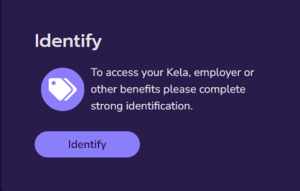
3. Verify your student status via the Studyinfo (Opintopolku) link (Account > My details > Student info).
For Waltti Mobile, use the lower “Verify as a student” link.
From the “Verify as a student” button, you will be directed to retrieve your own so-called study link from Studyinfo, which contains a valid study entitlement.
4. Once student verification has been completed, you can return to the Waltti Mobile app and log in using your student-verified Waltti user account, i.e. with the same credentials as for the Waltti online store.
How to purchase a Kela-subsidised school transport ticket in the Waltti Mobile app
Kela-subsidised student tickets are available in the Waltti Mobile app, the Waltti online store, and at Waltti service points. Please note that a Kela-subsidised ticket should only be valid in one place at a time, either in the mobile app or on a single travel card. If you purchase Kela-subsidised tickets for multiple locations at the same time (for example, both in Waltti Mobile and on a travel card, or on multiple travel cards), each purchase will consume your purchase entitlement separately. In the Waltti Mobile app, the validity of the ticket begins immediately at the time of purchase.
Purchasing a school transport subsidy ticket in the Waltti Mobile app requires that you have first applied for the school transport subsidy in the OmaKela service and received a purchase entitlement. Buying the ticket in Waltti Mobile also requires strong authentication using online banking credentials or a mobile certificate to verify the purchase entitlement.
- Start purchasing a school transport subsidy ticket by selecting My settings > Kela school transport subsidy under the Info tab. Activate the “Enable school transport subsidy ticket” button.
- Next, select “Kela-subsidised ticket” from the Buy tab.
- Complete strong authentication by clicking the “Identify” button. You can authenticate using your online banking credentials or a mobile certificate.
- After authentication, click the “Kela-subsidised ticket” button again. If purchase entitlements are found, you will see the Kela-subsidised tickets you are eligible to purchase. Select a product and click “Continue.”
- Select both zones, i.e. A–B, and click “Continue.”
- Review the selected product and confirm the ticket purchase by clicking the “Confirm” button. The ticket becomes valid immediately at the time of purchase.